Upgrading Web UI API 3.1 Service Pack
Use the following procedure to upgrade the Web UI API 3.1 Service Pack:
-
Open the Installation Folder and run the Service Pack file in Administrator mode, and then click Next.
-
Select I agree to accept the terms in the license agreement.
-
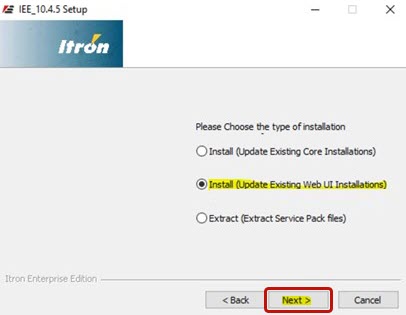
Select Install (Update Existing Web UI Installations) and click Next.
-
When the installation has completed, click Next.
-
Click Finish to close the dialog.
-
Validate the installation versions.
-
Go to Control Panel > Programs > Programs and Features on your device and verify the service pack versions.
